In This Guide
- Why Lockformer Maintenance Matters
- 1. Uneven or Loose Seam
- 2. Material Jams in Rollers
- 3. Scratches or Marking on Duct
- 4. Incorrect Seam Size
- 5. Excessive Noise or Vibration
- 6. Motor Overheating
- 7. Inconsistent Feed Speed
- 8. Cracked or Broken Rolls
- Preventive Maintenance Schedule
- Root Cause Map: From Symptom to Setting
- Spares to Hold on the Shelf
Why Lockformer Maintenance Matters
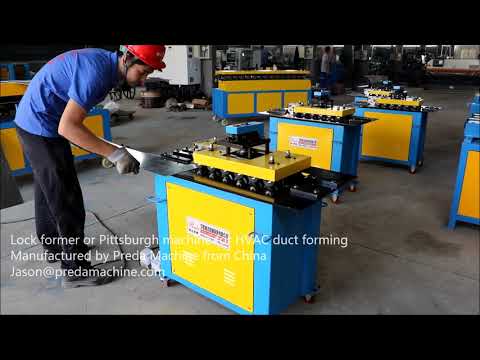
The Pittsburgh lockformer is one of the hardest-working machines in any HVAC shop. It runs continuously, forming the interlocking seam that holds rectangular duct together. When it malfunctions, the entire production line stops — and bad seams lead to leaky ducts, warranty claims, and unhappy customers.
Most lockformer problems are preventable with regular maintenance and quick diagnosis. Based on 15+ years of field service experience, here are the 8 most common problems and how to fix them.
Before You Troubleshoot
Always disconnect power before opening the machine cabinet. Keep the manual and parts diagram handy. If you are unsure about any repair, contact Preda Care for remote video support — we can diagnose most issues in under 15 minutes.
1. Uneven or Loose Seam
Symptoms: The Pittsburgh seam does not lock tightly. One side is tighter than the other, or the seam pulls apart with hand pressure.
Causes:
- Roller pressure is uneven between left and right sides
- Forming rolls are worn or out of alignment
- Material thickness is outside machine specification
- Inlet guide is not centered
Solutions:
- Adjust the pressure screws on both sides equally — turn 1/4 turn at a time, test after each adjustment
- Check roll alignment with a feeler gauge — gap should be uniform across the full width
- Verify material thickness is within 0.4-1.2mm range
- Center the inlet guide so material enters straight
2. Material Jams in Rollers
Symptoms: Galvanized sheet stops feeding, bunches up at inlet, or machine makes grinding noise.
Causes:
- Material is bent or warped before entering
- Roll gap is set too tight for the material thickness
- Foreign object (screw, scrap) is caught in rollers
- Drive chain is loose or skipping
Solutions:
- Always flatten material before feeding — use a leveler if sheets are warped
- Adjust roll gap to material thickness + 0.1mm clearance
- Disconnect power, remove covers, inspect and clear rollers
- Check chain tension — should have 10-15mm deflection at midpoint
Safety First
Never try to clear a jam while the machine is running. Always hit the emergency stop, disconnect power, and wait for all rollers to stop completely before reaching in.
3. Scratches or Marking on Duct
Symptoms: Visible scratches along the seam length, or galvanized coating is rubbed off, exposing bare steel.
Causes:
- Rolls have burrs or surface damage
- Material is being dragged across a sharp edge
- Pressure is too high, causing excessive friction
- Rolls need cleaning (zinc buildup)
Solutions:
- Inspect roll surfaces with a flashlight — remove burrs with fine sandpaper (400 grit)
- Check all guide surfaces for sharp edges, deburr as needed
- Reduce pressure slightly — just enough to form the seam without crushing
- Clean rolls weekly with a soft cloth and solvent to remove zinc dust buildup
4. Incorrect Seam Size
Symptoms: The Pittsburgh seam is too wide or too narrow, does not match the corresponding seam on the other duct piece.
Causes:
- Inlet guide setting is wrong
- Forming rolls are worn and need replacement
- Material thickness differs from what the machine was calibrated for
Solutions:
- Standard Pittsburgh seam is 28mm (1-1/8") — verify with calipers
- Adjust inlet guide position to change seam width
- Recalibrate when switching material thickness
- Replace forming rolls if worn more than 0.5mm (typically after 3-5 years of heavy use)
5. Excessive Noise or Vibration
Symptoms:Machine shakes noticeably during operation, or makes loud grinding/knocking sounds.
Causes:
- Machine is not level on the floor
- Bearing is failing in a roller shaft
- Drive belt is worn or misaligned
- Loose bolt or mounting screw
Solutions:
- Check machine level with a spirit level — adjust feet as needed
- Listen for the source of noise — a failing bearing usually makes a high-pitched whine
- Replace bearings if they have play or roughness when turned by hand
- Check and retighten all mounting bolts monthly
6. Motor Overheating
Symptoms: Motor shuts off due to thermal overload, or smells like burning insulation.
Causes:
- Running material too thick for the machine rating
- Roll gap too tight, causing excessive load
- Motor ventilation is blocked by dust
- Power supply voltage is too low
Solutions:
- Verify material thickness is within specification (typically 0.4-1.2mm for standard models)
- Loosen roll gap and test with scrap material
- Clean motor vents with compressed air monthly
- Check incoming voltage with a multimeter — should be within ±10% of rated voltage
7. Inconsistent Feed Speed
Symptoms: Material feeds fast then slow, or stops momentarily during forming.
Causes:
- Drive belt is slipping (worn or loose)
- Reduction gearbox oil is low or contaminated
- Roller bearings are starting to seize
Solutions:
- Check belt tension and replace if cracked or glazed
- Check gearbox oil level — top up with specified gear oil if low
- Replace bearings if they do not turn freely by hand
8. Cracked or Broken Rolls
Symptoms: Seam has a consistent defect at one point, or visible crack on a forming roll.
Causes:
- Fatigue from years of cyclic loading
- Accidental damage from foreign objects
- Overloading with material too thick
Solutions:
- Replace the damaged roll immediately — continued use will damage other rolls
- Preda keeps all wear parts in stock and ships free via Preda Care
- Roll replacement takes 30-60 minutes with basic tools
Preventive Maintenance Schedule
| Frequency | Task | Time Required |
|---|---|---|
| Daily | Clean rolls, check for debris, inspect seam quality | 5 min |
| Weekly | Check belt tension, lubricate chain, clean motor vents | 15 min |
| Monthly | Check roll alignment, verify seam size, tighten bolts | 30 min |
| Quarterly | Check gearbox oil, inspect bearings, calibrate pressure | 1 hour |
| Yearly | Replace belts, inspect all rolls, full electrical check | 2-3 hours |
Following this schedule will extend your lockformer's life to 10-15 years and reduce unexpected downtime by 80%. View our SA-15HB Pittsburgh lockformer →
Frequently Asked Questions
Preda Care: After-Sales That Never Expires
When you buy from Preda Machine, you get lifetime technical support. Our global agent network provides local service in 40+ countries. Free spare parts shipping, remote PLC diagnostics, video call troubleshooting, and on-site installation available.
- 24-hour response time
- Free spare parts shipping
- Remote PLC program support
- Global agent network
- Video call troubleshooting
- On-site installation
Root Cause Map: From Symptom to Setting
The eight problems listed above trace back to a small number of settings. This map is what our service engineers work through on a call.
| Symptom | Primary setting | Secondary check | Rare but real |
|---|---|---|---|
| Uneven or loose seam | Roll gap | Material thickness vs machine rating | Worn roll profile |
| Material jams in rollers | Entry guide alignment | Sheet edge condition (burr from shear) | Bent strip from the decoiler |
| Scratches on the duct face | Roll surface condition | Debris in the forming head | Roll hardness too low for stainless |
| Incorrect seam size | Roll set for the gauge | Wrong roll set installed | Mixed material in the batch |
| Noise or vibration | Bearing condition | Mounting bolts, foundation | Gearbox wear |
| Motor overheating | Load vs rating | Supply voltage under load | Cooling fan obstructed |
| Inconsistent feed speed | Drive tension | Lubrication | Controller parameter drift |
| Cracked rolls | Over-capacity material | Foreign object impact | Roll material defect |
Change One Setting at a Time
The most common way to turn a two-minute adjustment into a two-hour problem is to change three things at once. Adjust the gap, run a test piece, measure, then decide. Write down what you changed and what the result was — that record is what makes the next occurrence fast.
Spares to Hold on the Shelf
| Part | Hold | Why | Lead time if ordered |
|---|---|---|---|
| Forming rolls (per profile) | 1 set | Wear item; no workaround | 3 – 6 weeks |
| Shear blade | 2 | Dull blade causes edge burr and jams | 2 – 4 weeks |
| Drive belt | 2 | Fails without warning | 1 – 2 weeks |
| Bearing set | 1 set | Noise appears before failure | 1 – 3 weeks |
| Lubricator and filters | 1 each | Cheap; blocks cause overheating | 1 week |
| Contactor / relay set | 1 set | Common electrical failure | 1 – 2 weeks |
| Gearbox oil | 1 fill | Used at every service | Local |
Total cost is typically 3–5% of the machine price and converts a three-week stoppage into a same-day repair. For a single-machine shop, that is the cheapest insurance available.
Have Questions About Your Project?
Tell us your duct specifications, daily volume, and workshop size — our engineers recommend the perfect equipment within 24 hours.
Get Free ConsultationContinue Reading: Related Guides
Go deeper on this topic, then compare the machines that do the work.
Pittsburgh Lockformer Maintenance Guide
Daily, weekly and annual service schedule that keeps a lockformer accurate past ten years.
Read the guide → Buying GuidePittsburgh Lockformer Buying Guide 2026
SA-15HB vs SA-12HB vs snaplock vs S&drive: which lock profile and machine fits your duct class.
Read the guide → Buying GuideSeam Locker Buying Guide 2026
Portable vs CNC hydraulic vs Pittsburgh L-12 closers — where each one pays for itself.
Read the guide → MaintenanceAuto Duct Line Preventive Maintenance Guide
The service checklist that protects a six-figure line investment from unplanned downtime.
Read the guide →Machines covered in this topic
Compare specifications, gauge range and output for the machines discussed above.
CNC Hydraulic Pittsburgh Seam Locker HF-1550
CNC hydraulic seam closing for long duct sections
View specs → MachinePittsburgh Machine SA-15HB
Pittsburgh lock forming up to 1.2 mm
View specs → MachineS Cleat Lock Former Machine SA-12S
S-cleat and drive cleat lock forming
View specs → MachineDuct Seam Closing Machine
Standalone seam closing for rectangular duct
View specs →